0 0
0
No products in the cart.

Arduino Mega Keyestudio

Brand: Mero tronics

EGP535.00 EGP580.00

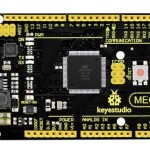
Keyestudio Mega 2560 compatible Advanced is a microcontroller board based on the ATMEGA2560-16AU , fully compatible with Keyestudio Mega 2560 R3 board and ARDUINO MEGA 2560 REV3.
It has 54 digital input/output pins (of which 15 can be used as PWM outputs), 16 analog inputs, 4 UARTs (hardware serial ports), a 16 MHz crystal oscillator, a USB connection, a power jack, 2 ICSP headers, and a reset button.
It contains everything needed to support the microcontroller. With its bootloader, program can be downloaded directly with USB and you don’t need to use other external programmer.
Just simply connect it to a computer with a USB cable or power it via an external DC power jack (DC 7-12V) or via female headers Vin /GND (DC 7-12V) to get started.
 

Note:
the most important difference between keyestudio MEGA 2560 compatible board Advanced and keyestudio MEGA 2560 R3 board is the voltage regulator chip used in the board. 


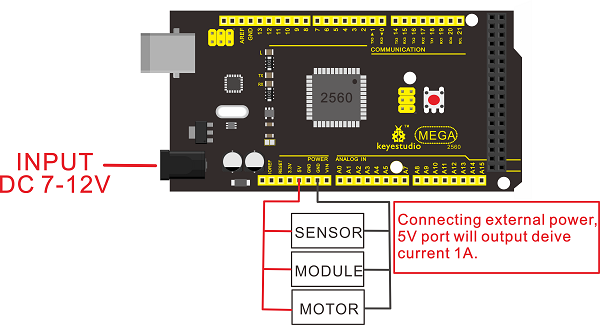
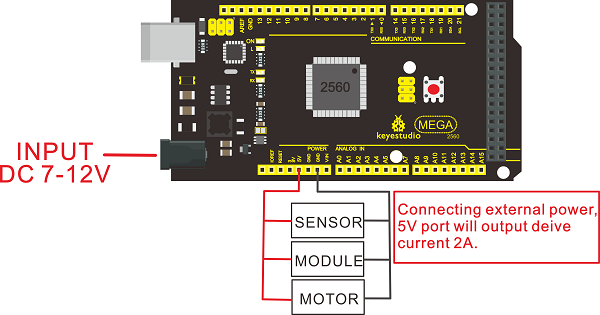
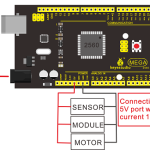
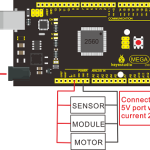
The voltage regulator chip used in keyestudio MEGA 2560 R3 board is NSP1117. When connect the external power, output 5V, the drive current is 1A. However, keyestudio MEGA 2560 compatible board Advanced features the voltage-regulator chip MP2307DN. When connect the external power, output 5V, the drive current can be 2A. 


The MEGA 2560 is designed for more complex projects. With 54 digital I/O pins, 16 analog inputs and a larger space for your sketch, it is the recommended board for 3D printers and robotics projects. This gives your projects plenty of room and opportunities.
 

 keyestudio MEGA 2560 compatible board Advancedkeyestudio MEGA 2560 R3 board
voltage-regulator chipMP2307DNNSP1117
Power Output5V5V
Drive Current(external power)2A1A
Drive Current(USB power)0.5A0.5A


keyestudio MEGA 2560 R3 board: 


KS0342-1A.png


keyestudio MEGA 2560 compatible board Advanced: 


KS0342-2A.png


TECH SPECS
MicrocontrollerATMEGA2560-16AU
Operating Voltage5V
Input Voltage (recommended)DC7-12V
Digital I/O Pins54 (D0-D53)
PWM Digital I/O Pins15 (D2-D13; D44-D46)
Analog Input Pins16 (A0-A15)
DC Current per I/O Pin20 mA
DC Current for 3.3V Pin50 mA
Flash Memory256 KB of which 8 KB used by bootloader
SRAM8 KB
EEPROM4 KB
Clock Speed16 MHz
LED_BUILTIND13


Details
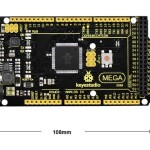
  • Dimensions: 108mm x 53.5mm x 15mm
  • Weight: 33.6g


KS0342-1.jpg


Element and Pin Interfaces

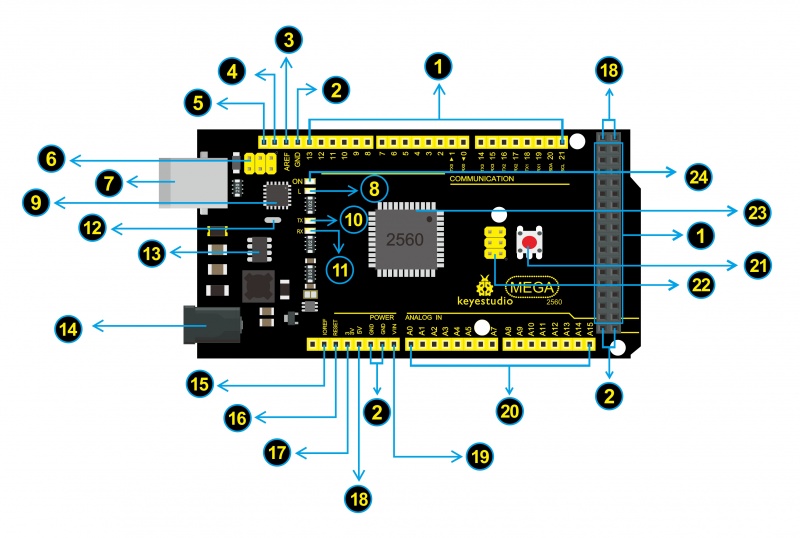
Here is an explanation of what every element and interface of the board does:
KS0342 引脚标图.jpg
 

KS0001 5-1.png

Digital I/O

Arduino MEGA has 54 digital input/output pins (of which 15 can be used as PWM outputs). These pins can be configured as digital input pin to read the logic value (0 or 1). Or used as digital output pin to drive different modules like LED, relay, etc.
Using pinMode(), digitalWrite(), and digitalRead() functions.
 

KS0001 5-2.png

GND

Ground pins

KS0001 5-3.png

AREF

Reference voltage (0-5V) for analog inputs. Used with analogReference(). Configures the reference voltage used for analog input (i.e. the value used as the top of the input range).

KS0001 5-4.png

SDA

IIC communication pin

KS0001 5-5.png

SCL

IIC communication pin

KS0001 5-6.png

ICSP (In-Circuit Serial Programming) Header

the AVR, an Arduino micro-program header consisting of MOSI, MISO, SCK, RESET, VCC, and GND. Connected to the ATMEGA16U2-MU. When connecting to PC, program the firmware to ATMEGA16U2-MU.

KS0001 5-7.png

USB Connection

Arduino board can be powered via USB connector.
All you needed to do is connecting the USB port to PC using a USB cable.

KS0001 5-8.png

D13 LED

There is a built-in LED driven by digital pin 13. When the pin is HIGH value, the LED is on, when the pin is LOW, it's off.

KS0001 5-9.png

ATMEGA 16U2-MU

USB to serial chip, can convert the USB signal into serial port signal.

KS0001 5-10.png

TX LED

Onboard you can find the label: TX (transmit)
When Arduino board communicates via serial port, send the message, TX led flashes.

KS0001 5-11.png

RX LED

Onboard you can find the label: RX(receive )
When Arduino board communicates via serial port, receive the message, RX led flashes.

KS0001 5-12.png

Crystal Oscillator

How does Arduino calculate time? by using a crystal oscillator.
The number printed on the top of the Arduino crystal is 16.000H9H. It tells us that the frequency is 16,000,000 Hertz or 16MHz.

KS0001 5-13.png

Voltage Regulator

Convert an external input DC7-12V voltage into DC 5V, then switch DC 5V to the processor and other components. Output DC 5V, the drive current is 2A.

KS0001 5-14.png

DC Power Jack

Arduino board can be supplied with an external power DC7-12V from the DC power jack.

KS0001 5-15.png

IOREF

This pin on the board provides the voltage reference with which the microcontroller operates. A properly configured shield can read the IOREF pin voltage and select the appropriate power source or enable voltage translators on the outputs for working with the 5V or 3.3V.

KS0001 5-16.png

RESET Header

Connect an external button to reset the board. The function is the same as reset button.

KS0001 5-17.png

Power Pin 3V3

Provides 3.3V voltage output

KS0001 5-18.png

Power Pin 5V

Provides 5V voltage output

KS0001 5-19.png

Vin

You can supply an external power input DC7-12V through this pin to Arduino board.

KS0001 5-20.png

Analog Pins

Onboard has 16 analog inputs, labeled A0 to A15.

KS0001 5-21.png

RESET Button

You can reset your Arduino board, for example, start the program from the initial status. You can use the RESET button.

KS0001 5-22.png

ICSP (In-Circuit Serial Programming) Header

the AVR, an Arduino micro-program header consisting of MOSI, MISO, SCK, RESET, VCC, and GND.
It is often called the SPI (serial peripheral interface) and can be considered an "extension" of the output. In fact, slave the output devices to the SPI bus host.
When connecting to PC, program the firmware to ATMEGA2560-16AU.

KS0001 5-23.png

Microcontroller

Each Arduino board has its own microcontroller. You can regard it as the brain of your board.
The main IC (integrated circuit) on the Arduino is slightly different from the panel pair. Microcontrollers are usually from ATMEL. Before you load a new program on the Arduino IDE, you must know what IC is on your board. This information can be checked at the top of IC.

KS0001 5-24.png

Power LED Indicator

Powering the Arduino, LED on means that your circuit board is correctly powered on. If LED is off, connection is wrong.


Package Included
  • Keyestudio MEGA 2560 Advanced board * 1pcs
  • USB cable * 1pcs


KS0342-3.jpg

Quantity

SKU: Arduino Mega Keyestudio

Categories: Arduino

0.00

5 Star
0%
4 Star
0%
3 Star
0%
2 Star
0%
1 Star
0%

Submit Your Review

Please login to write review!

Upload photos
You can upload up to 6 photos, each photo maximum size is 2048 kilobytes

Related products